AI
关于AI的学习笔记

前言:最近在阅读官方MCP文档,学习下来的感受是:MCP囊括的领域很广——不仅仅是 数据层和传输层的抽象封装 ,开发层面上需要对服务架构、网络通信等各个环节进行适配,同时加速了软件间的串通,让 【互联网】的【互联】 概念更具象化。

MCP:概念

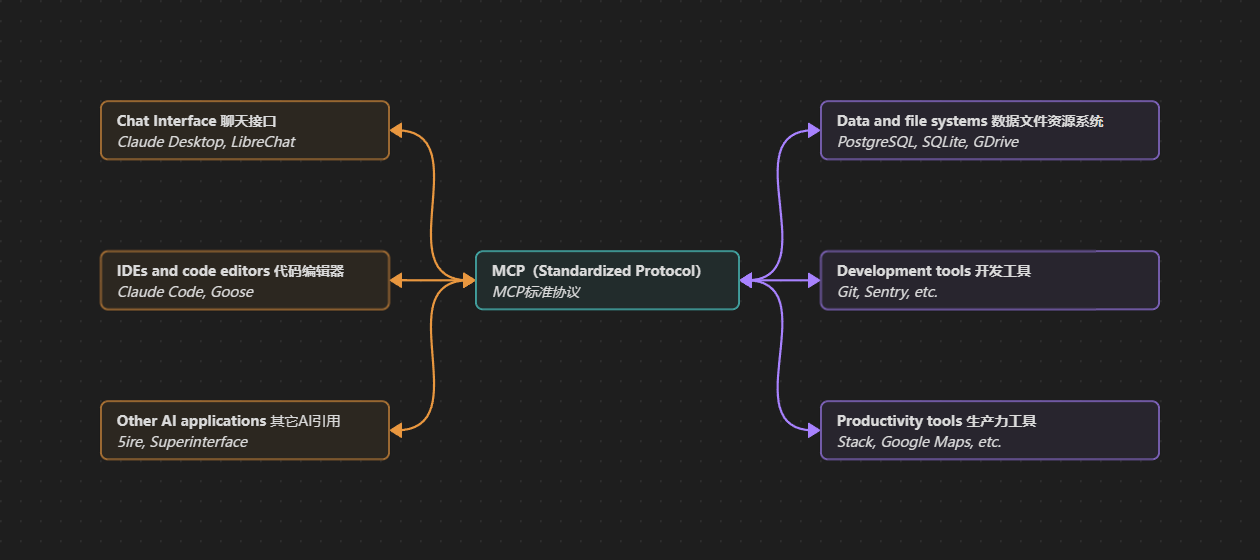
MCP能实现什么
MCP能实现什么

MCP是将 AI应用程序 连接到 外部系统开源标准

提问1:MCP能实现什么?

MCP使AI能够访问 关键信息 并执行任务

💡思考:在团队加入新人时,也需要开通新的代码库、文档站点读写权限,MCP也是在做类似的工作

根据我个人的开发状况,可以联想到MCP能帮我实现这些:

切图

从Design App(如 Figma )获取设计图纸,生成 Front Code

代码库管理

获取代码仓库(如GitHub、Gitlab)代码管理权限,能够自主建立代码仓库,包括:

  • 初始化代码框架
  • 总结commit和issue情况
  • 设置自动化Workflow
接口对接

实现如下功能:

  • 根据服务端接口文档,自动生成 TS Interface
  • 接口调用封装
调试

连接 Browser Consoler ,实现如下需求:

  • 自动下断点实现浏览器端调试
  • 书写Script脚本进行Debug
  • 根据Performance性能测试进行优化
博客书写

实现如下需求:

  • 读取Obsidian中的 Draft MD 文档
  • 根据 Draft 的资源引用情况,操作 FileSystem ,将Blog所需assets整理到 Hexo 项目的指定文件夹下
  • 精简美化 Draft 内容,生成一篇完整的文章

💡 思考:纵观整个MCP架构设计,能看出——AI Tools其实只是架构中的一环。

一个完整的MCP流程,从用户层交互,到数据层抽象,到传输层设计,还有网络安全(身份认证)、技术推广(调试)等要素,LLM只是其中的一个环节。

工作流程自动化技术其实一直都在发展,但从未像今天一样受到如此重视。直到LLM技术的突破,以点带面加速了整个链条转动,回环中的每个节点都开始活跃起来。

💡 当前AI应用还正处于上升期,传统应用向AI转型的需求很大,短期内对开发人员的需求量可能会更大。

要抓住这波转型机会,就不能和以往一样——被动接受市面上已趋于稳定收敛的技术,必须培养架构师思维。

提问2:谁有MCP需求?

开发者 Dev

做第一个吃螃蟹的人。
开发软件时使用MCP协助工作流集成。

任何需要使用多工具协同工作的用户

只要Workflow中存在本地/远程多软件协同的环节
就可以作为MCP的潜在需求者

MCP:原理

架构概述

MCP仅关注上下文如何交换——并不规定AI应用如何使用LLM或如何管理提供的上下文。

💡 思考:远程MCP传输层依赖的http协议,会规定浏览器要如何管理请求到的资源数据:是否缓存、何时过期销毁等等。

MCP协议范围

MCP协议包含以下项目

MCP规范【先画个框架】
  • MCP技术规范,概述了客户端和服务端的实现要求
MCP SDK【框架已有,各位自由发挥】
  • 实现MCP协议的不同编程语言SDK
MCP开发工具【你让大家用这个技术,总得提供个调试器吧】
  • 用于开发MCP服务端/客户端的工具(MCP Inspector)
MCP参考服务端/客户端实现【Ctrl+C/Ctrl+V的模板不就有了】
  • MCP服务端/客户端实现示例

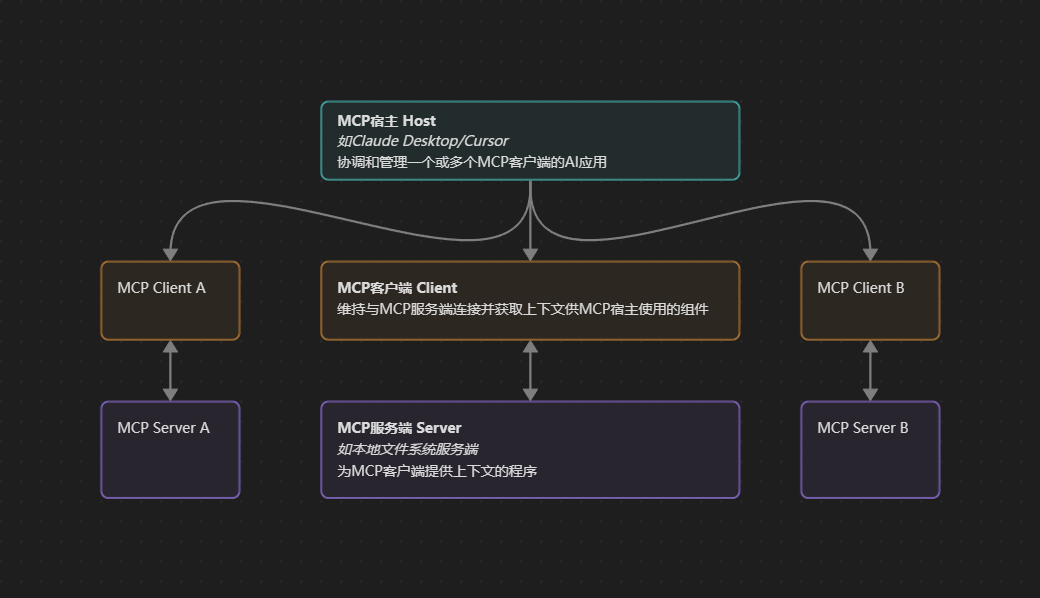
MCP参与者结构

MCP参与者结构
MCP参与者结构

Claude Code | Claude Desktop 等AI应用

  • 功能:协调和管理一个或多个 MCP ClientAI Application
功能
  • 维持与 MCP Server 连接并获取 Context
  • Host 使用的组件
  • MCP Client 提供 Context 的 程序
  • 分为 LocalRemote 两种
    • 本地 Local:使用STDIO传输
    • 远程 Remote:使用HTTP流式传输

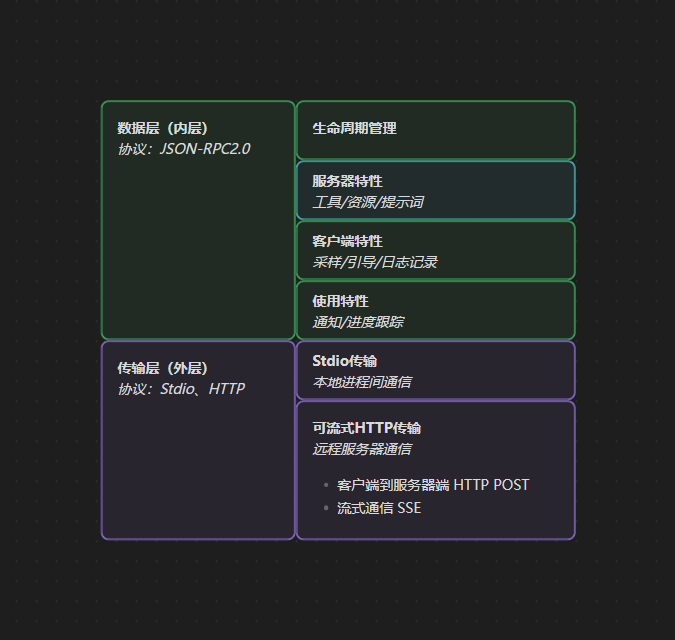
MCP结构分层

MCP结构分层
MCP结构分层
数据层(内层)

基于 JSON-RPC2.0Client-Server 通信协议

包含内容
  • 生命周期管理
  • 服务端原语特性 (Tools、Resources、Prompts)
  • 客户端原语特性 (Sampling、Elicitation、Logging)
  • 实用特性 (通知、进度跟踪)
传输层(外层)

定义支持 Client-Server 之间数据交换的通信机制和通道

包含内容

包含特定传输方式的连接建立、消息分帧和授权

STDIO传输:本地进程间通信

  • 使用标准Input/Output进行统一机器上本地进程间的直接通信

可流式HTTP传输:远程服务器通信

  • HTTP POST:客户端到服务端
  • SSE:流式通信
  • 建议使用 OAuth 来获取身份验证令牌

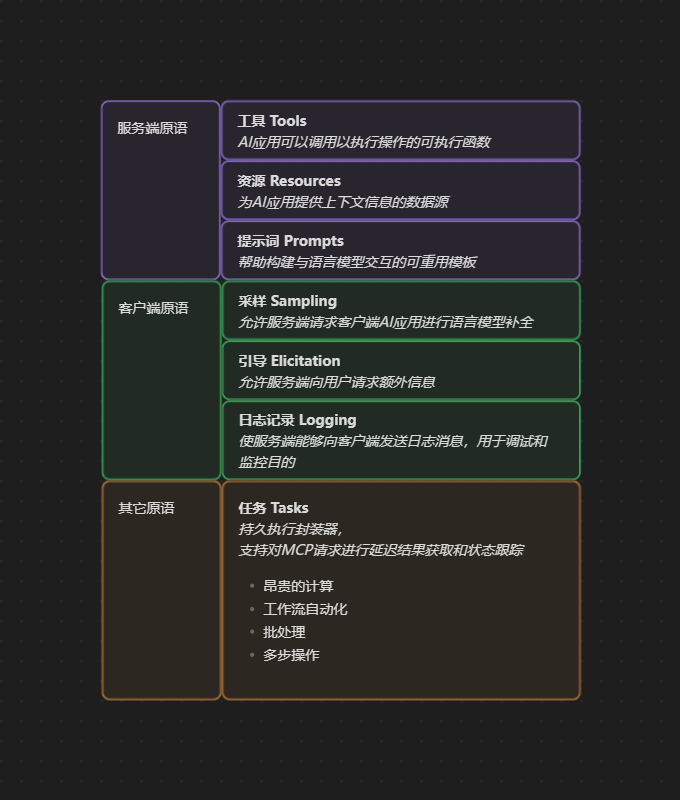
MCP原语

MCP原语
MCP原语
服务端原语
  • 工具 Tools:AI应用可以调用以执行操作的可执行函数
  • 资源 Resources:为AI应用提供上下文信息的数据源
  • 提示词 Prompts:帮助构建与语言模型交互的可重用模板
客户端原语
  • 采样 Sampling:允许Server请求Client AI应用进行LLM补全
  • 引导 Elicitation:允许Server向Client请求额外信息
  • 日志 Logging:使Server能够向Client发送Logging信息,用于调试和监控
横向实用原语
  • 任务 Tasks:持久执行封装器,支持对MCP请求进行Delay结果获取和状态跟踪,如
    • 昂贵的计算
    • 工作流自动化
    • 批处理
    • 多步操作

Demo:MCP传输示例

Demo 1:初始化
STEP 1 Client Req:初始化

ClientServer 发送initialize请求,以建立连接,并协商支持的特性

1
2
3
4
5
6
7
8
9
10
11
12
13
14
15
{
"jsonrpc": "2.0",
"id": 1,
"method": "initialize",
"params": {
"protocolVersion": "2025-06-18", // 协议版本协商
"capabilities":{ //能力发现(服务端原语支持情况)
"elicitation": {} // 客户端声明可以处理用户交互请求,可以接收elicitation/create方法调用
},
"clientInfo": { // 提供标识和版本信息,用于调试和兼容性目的
"name": "example-client",
"version": "1.0.0"
}
}
}
STEP 2 Server Res:初始化

Server 回复 Clientinitialize请求

1
2
3
4
5
6
7
8
9
10
11
12
13
14
15
16
17
18
{
"jsonrpc": "2.0",
"id": 1,
"method": "initialize",
"params": {
"protocolVersion": "2025-06-18",
"capabilities":{
"tools": { // 服务端支持工具原语
"listChanged": true // 支持tools/list_changed通知
},
"resources": {} // 支持资源原语,可以处理resources/list和resources/read方法
},
"serverInfo": {
"name": "example-server",
"version": "1.0.0"
}
}
}
STEP 3 Client Req:就绪

initialize成功Client 发送就绪通知

1
2
3
4
{
"jsonrpc": "2.0",
"method": "notifications/initialized"
}
AI应用初始化
  • MCP Client Manager 会建立与已配置 Server 的连接
  • Client 会存储 Server 的能力
  • ClientServer 的原语和是否支持实时更新能力有所了解
1
2
3
4
5
6
async with stdio_client(server_config) as (read, write):
async width ClientSession(read, write) as session:
init_response = await session.initialize()
if init_response.capabilities.tools:
app.register_mcp_server(session, supports_tools=True)
app.set_server_ready(session)
Demo 2:工具发现
STEP 1 Client Req:查询可用工具

Client 通过发送tools/list请求发现可用 Tools

1
2
3
4
5
{
"jsonrpc": "2.0",
"id": 2,
"method": "tools/list"
}
STEP 2 Server Res:返回工具

(中文翻译文档看不到这段)

STEP 3 AI应用注册工具

AI App 将获取到的 Tools 合并到一个LLM可以访问到的统一工具注册表中:

1
2
3
4
5
avaliable_tools = []
for session in app.mcp_server_sessions():
tools_response = await session.list_tools()
avaliable_tools.extend(tools_response.tools)
conversation.register_available_tools(available_tools)
Demo 3:工具执行
STEP 1 Client Req:执行工具

Client 通过 tools/call 方法执行 Tools

1
2
3
4
5
6
7
8
9
10
11
12
{
"jsonrpc": "2.0",
"id": 3,
"method": "tools/call",
"params": {
"name": "weather_current", // 和响应的工具名称需要完全匹配
"arguments": {
"location": "San Francisco",
"units": "imperial"
}
}
}
STEP 2 Server Res:响应请求

响应格式覆盖:

  • content数组:多格式响应
  • 内容类型:[type]:xxx
  • 结构化输出
STEP 3 AI App 实现
1
2
3
4
async def handle_tool_call(conversation, tool_name, arguments):
session = app.find_mcp_session_for_tool(tool_name)
result = await session.call_tool(tool_name, arguments)
conversation.add_tool_result(result.content)
Demo 4:实时更新
STEP 1 Server Info:主动通知

Server 主动通知已连接的 Client

1
2
3
4
{
"jsonrpc": "2.0",
"method": "notifications/tools/list_changed"
}
STEP 2 Client Req:响应通知

Client 通常需要请求更新后的 Tools 列表作为响应

1
2
3
4
5
{
"jsonrpc": "2.0",
"id": 4,
"method": "tools/list"
}
STEP 3 AI APP端实现
1
2
3
4
5
async def handle_tools_changed_notification(session):
tools_response = await session.list_tools()
app.update_available_tools(session, tool_response.tools)
if app.conversation.is_active():
app.conversation.notify_llm_of_new_capabilities()

服务器 Servers

工具 Tools

工具定义

具有明确类型化Input和Output的单一特定操作

  • 执行前可能需要用户授权
  • 协议操作
    • tools/list 发现可用工具
    • tools/call 执行特定工具
Example:定义/调用示例

定义示例:

1
2
3
4
5
6
7
8
9
10
11
12
13
{
name: "searchFlights",
description: "Search for available flights",
inputSchema: {
type: "object",
properties: {
origin: { type: "string", description: "Departure city"},
destination: { type: "string", description: "Arrival city"},
date: { type: "string", format: "date", description: "Travel date" }
},
required: ["origin", "destination", "date"]
}
}

调用示例:

1
searchFlights(origin: "NYC", destination: "Barcelona", date: "2026-02-11")
用户交互模型

MCP强调通过多种机制进行人工监督 ,如:

  • 允许User开启或关闭可用工具
  • 针对单个Tool执行Confirm对话框
  • 预批准某些安全操作的权限设置
  • 显示所有工具执行情况与活动日志

资源 Resources

资源索引

每个资源使用 URI|MIME 形式进行索引

  • 直接资源:固定URI
  • 资源模板:动态URI
1
2
3
4
5
6
7
{
"uriTemplate": "weather://forecast/{city}/{daate}",
"name": "weather-forecast",
"title": "Weather Forecast",
"description": "Get weather forecast for any city and date",
"mimeType": "application/json"
}
协议操作
  • resources/list
  • resources/templates/list
  • resources/read
  • resources/subscribe 监控资源变化
用户交互模型
  • 资源管理器可视化
  • AI智能建议
  • 用户手动限制资源范围

提示词 Prompts

Prompts定义

Prompts 允许 MCP Server Author 为特定领域提供参数化提示。

Prompts 如何工作:

  • 定义了预期 Input 和交互模式的结构化模版
  • 由 User Control ,需要显式调用而非自动触发
  • 支持参数补全,以帮助用户发现有效的参数值
协议操作
  • prompts/list
  • prompts/get
定义示例
1
2
3
4
5
6
7
8
9
10
11
{
"name": "plan-vacation",
"title": "Plan a vacation",
"description": "Guide through vacation planning process",
"arguments": [
{ "name": "destination", "type": "string", "required": true },
{ "name": "duration", "type": "number", "description": "days" },
{ "name": "budget", "type": "number", "required": false },
{ "name": "interests", "type": "array", "items": { "type": "string" } }
]
}
用户交互模型
  • 易于发现可用提示词
  • 清晰描述每个提示词的功能
  • 带有验证的自然参数输入
  • 透明展示提示词的底层模版

示例 Demo

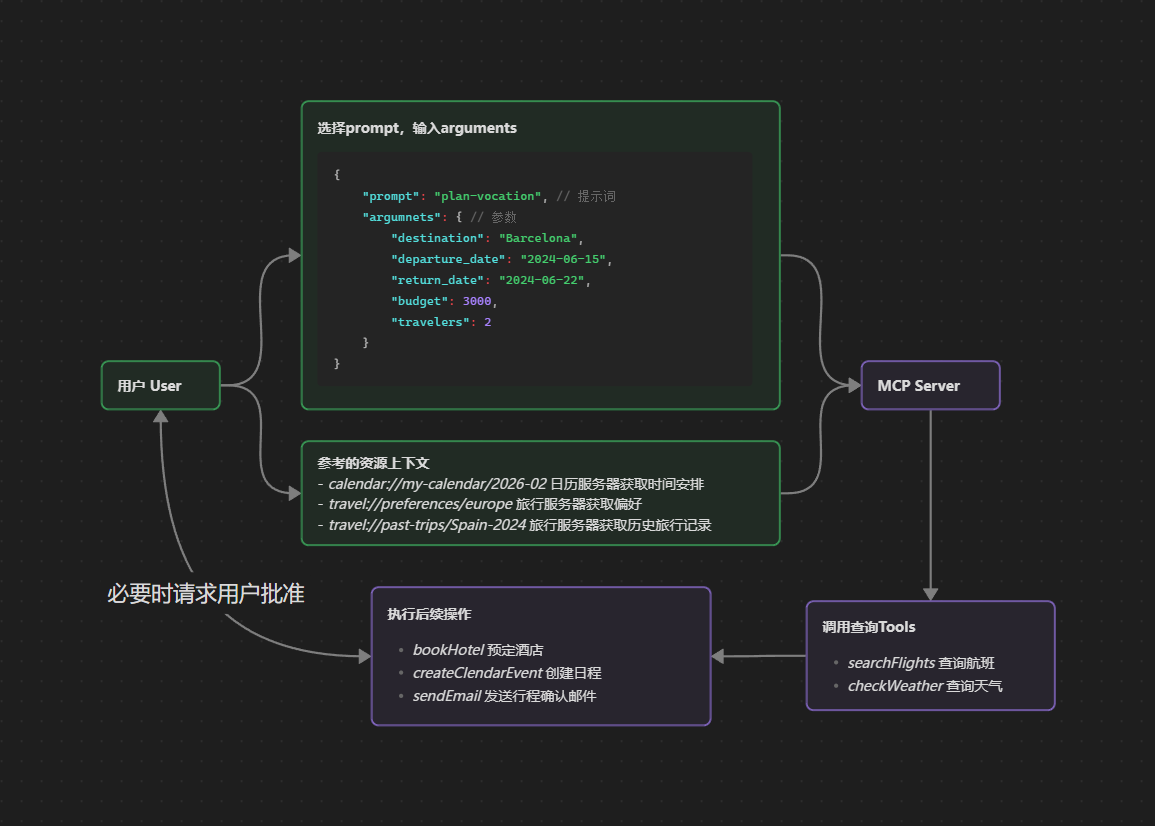
MCP工作流程图
MCP工作流程图
STEP 1 User选择Prompt,输入Arguments

用户选择假期规划(plan-vocation)提示词:

1
2
3
4
5
6
7
8
9
10
{
"prompt": "plan-vocation", // 提示词
"argumnets": { // 参数
"destination": "Barcelona",
"departure_date": "2024-06-15",
"return_date": "2024-06-22",
"budget": 3000,
"travelers": 2
}
}
STEP 2 User选择供参考的资源上下文
  • calendar://my-calendar/2026-02 日历服务器获取时间安排
  • travel://preferences/europe 旅行服务器获取偏好
  • travel://past-trips/Spain-2024 旅行服务器获取历史旅行记录
STEP 3 LLM调用MCP Server提供的Tools处理请求
  1. 首先获取用户指定的资源

  2. 执行查询工具

    • searchFlights 查询航班
    • checkWeather 查询天气
  3. 根据这些信息,执行后续操作,必要时请求用户批准

    • bookHotel 预定酒店
    • createClendarEvent 创建日程
    • sendEmail 发送行程确认

客户端 Clients

Host与Client的区别
  • Host 用户交互的 Application
  • Client 实现与 Server 连接的协议级组件

引出 Elicitation

信息征询
  • Server 可以在交互过程中向 User 请求特性信息
  • 动态特性 :按需收集必要信息,更加人性化
    • Server 无需预先要求所有信息
    • Server 不会在缺少数据时直接报错
    • Server 可以暂停操作,向用户请求特定输入
信息征询组件示例
1
2
3
4
5
6
7
8
9
10
11
12
13
14
15
16
17
18
19
20
21
22
23
24
25
26
27
28
29
30
31
{
method: "elicitation/requestInput",
params: {
message: "Please confirm your Barcelona vacation booking details:",
schema: {
type: "object",
properties: {
confirmBooking: {
type: "boolean",
description: "Confirm the booking (Flights + Hotel = $3,000)"
},
seatPreference: {
type: "string",
enum: ["window", "aisle", "no preference"],
description: "Preferred seat type for flights"
},
roomType: {
type: "string",
enum: ["sea view", "city view", "garden view"],
description: "Preferred room type at hotel"
},
travelInsurance: {
type: "boolean",
default: false,
description: "Add travel insurance ($150)"
}
},
required: ["confirmBooking"]
}
}
}
用户交互模型
  • 请求呈现Request 消息解释了目的, Schema 提供结构和验证
  • Response选项:通过适当的UI控件收集 User Response 选项
  • Privacy隐私:绝不请求 Password or API Key ,对可疑请求发出警告

根 Roots

根目录
  • ClientServer 传到 FileSystem 访问边界的一种机制
  • 不强制执行(MUST)安全限制,只提供预期参考(SHOULD)
  • 实际安全性需要在OS级别实现
  • 仅限 FileSystem Path
    • 使用 file:// 方案
    • 可以支持动态更新(roots/list_changed接收通知)
指定根目录示例
1
2
3
4
{
"uri": "file:///Users/agent/travel-planning",
"name": "Travel Planning Workspace"
}
用户交互模型
  • 自动根目录检测
  • 手动根目录配置

采样 Sampling

采样定义

Server 可以请求已经拥有 LLM 访问权限的 Client 代其处理这些任务,

比如:

  1. Tool 用于查询所有符合条件的航班
  2. User 调用后, Tool 将查询结果返回到 Client
  3. Client 接收到数据后,再交付到 Client LLM 进行下一步择优操作
  4. 最后 Client LLM 将择优结果返回到 User

💡思考:LLM类似窗口接待员,原本程序员不仅要设计整体服务流程,还要设计各种细节:接待规范用语、个性化服务、意外事件处理机制等等,但现在这些细节全都【委托】给了LLM,开发越来越接近框架设计/协调/管理职能。

💡 “A窗口(Client)的User选择 3号服务套餐(Prompt),User填好了Form,交给 A窗口接待员(LLM),接待员连接 远程数据库(Resource),查询到了User的服务偏好,把Form和Preference Data发送给 后台办事员(MCP Server),办事员发现FormData不完整,请求User进行补全(Elicitation),最后根据信息生成了用户想要的数据,发送回接待员处,并要求接待员帮忙美化表述一下(Sampling),最后返还给User”

用户交互模型
  • 审批控制:可能需要明确的用户同意
  • 透明度功能
    • Client 可以显示确切的 Prompt、Model Selection、Token 限制
    • 💡思考:确实,Sampling 如果不加限制使用,可能会造成隐性 Token 消耗
  • 配置选项:确保用户端控制权
    • 设置模型偏好
    • 为受信任的操作配置自动审批
  • 安全考虑:妥善处理敏感数据
    • 实施速率限制并验证所有信息内容
    • 人工干预设计

MCP:开发

连接本地MCP服务器

准备工作
  • Claude Desktop
  • NodeJs

配置 claude_desktop_config.json 文件,
这里官方教程推荐使用 npx命令运行filesystem
但是我运行时报错:

1
Unexpected token 'A', "Active cod"... is not valid JSON

似乎是服务器输出中包含 非JSON内容 ,干扰了JSON-RPC通信,
所以这里我直接本地全局安装npm库,通过node命令运行:

1
2
3
4
5
6
7
8
9
10
11
{
"mcpServers": {
"filesystem": {
"command": "node",
"args": [
"D:\\nvm\\nodejs\\node_modules\\@modelcontextprotocol\\server-filesystem\\dist\\index.js",
"D:/local_code/ASHIKACHI/code/ai/Claude_workSpace"
]
}
}
}
  • 重启Claude Desktop生效
  • 如有报错可以看log文件进行排查
  • 运行示例:能读取 Claude_workSpace目录 下的xxx文件内容吗

连接远程MCP服务器

MCP-Remote-Server
远程MCP Server
  • 托管在互联网上
  • 与各种服务集成
    • 项目管理工具
    • 文档系统(Notion
    • 代码仓库(Github
    • 其他启用的API服务
  • 可访问性很高,特别是有如下需求的软件
    • 基于Web的AI应用
    • 需要服务端处理/身份验证的服务
配置案例
  • Host:Qwen
  • MCP Server:baidu-map

命令行(具体参考官方文档):

1
qwen mcp add --transport http baidu-map https://mcp.map.baidu.com/mcp?ak=API_KEY

构建MCP服务器

STEP 1 安装uv,设置Python项目环境
1
powershell -ExecutionPolicy ByPass -c "irm https://astral.sh/uv/install.ps1 | iex"

重启 Terminal ,让uv命令被识别

STEP 2 Terminal创建项目
1
2
3
4
5
6
7
8
9
10
11
12
13
# Step 1: init proj fold
uv init weather
cd weather

# Step 2 env active
uv venv
.venv\Scripts\activate

# Step 3 package install
uv add mcp[cli] httpx

# Step 4 create py
new-item weather.py
STEP 3 weather.py文件实现
1
2
3
4
5
6
7
8
9
10
11
12
13
14
15
16
17
18
19
20
21
22
23
24
25
26
27
28
29
30
31
32
33
34
35
36
37
38
39
40
41
42
43
44
45
46
47
48
49
50
51
52
53
54
55
56
57
58
59
60
61
62
63
64
65
66
67
68
69
70
71
72
73
74
75
76
77
78
79
80
81
82
83
84
85
86
87
88
89
90
91
92
93
from typing import Any
import httpx
from mcp.server.fastmcp import FastMCP

# Initialize FastMCP server
mcp = FastMCP("weather")

# Constants
NWS_API_BASE = "https://api.weather.gov"
USER_AGENT = "weather-app/1.0"

async def make_nws_request(url: str) -> dict[str, Any] | None:
"""Make a request to the NWS API with proper error handling."""
headers = {
"User-Agent": USER_AGENT,
"Accept": "application/geo+json"
}
async with httpx.AsyncClient() as client:
try:
response = await client.get(url, headers=headers, timeout=30.0)
response.raise_for_status()
return response.json()
except Exception:
return None

def format_alert(feature: dict) -> str:
"""Format an alert feature into a readable string."""
props = feature["properties"]
return f"""
Event: {props.get('event', 'Unknown')}
Area: {props.get('areaDesc', 'Unknown')}
Severity: {props.get('severity', 'Unknown')}
Description: {props.get('description', 'No description available')}
Instructions: {props.get('instruction', 'No specific instructions provided')}
"""

@mcp.tool()
async def get_alerts(state: str) -> str:
"""Get weather alerts for a US state.

Args:
state: Two-letter US state code (e.g. CA, NY)
"""
url = f"{NWS_API_BASE}/alerts/active/area/{state}"
data = await make_nws_request(url)

if not data or "features" not in data:
return "Unable to fetch alerts or no alerts found."

if not data["features"]:
return "No active alerts for this state."

alerts = [format_alert(feature) for feature in data["features"]]
return "\n---\n".join(alerts)

@mcp.tool()
async def get_forecast(latitude: float, longitude: float) -> str:
"""Get weather forecast for a location.

Args:
latitude: Latitude of the location
longitude: Longitude of the location
"""
# First get the forecast grid endpoint
points_url = f"{NWS_API_BASE}/points/{latitude},{longitude}"
points_data = await make_nws_request(points_url)

if not points_data:
return "Unable to fetch forecast data for this location."

# Get the forecast URL from the points response
forecast_url = points_data["properties"]["forecast"]
forecast_data = await make_nws_request(forecast_url)

if not forecast_data:
return "Unable to fetch detailed forecast."

# Format the periods into a readable forecast
periods = forecast_data["properties"]["periods"]
forecasts = []
for period in periods[:5]: # Only show next 5 periods
forecast = f"""
{period['name']}:
Temperature: {period['temperature']}°{period['temperatureUnit']}
Wind: {period['windSpeed']} {period['windDirection']}
Forecast: {period['detailedForecast']}
"""
forecasts.append(forecast)

return "\n---\n".join(forecasts)
if __name__ == "__main__":
# Initialize and run the server
mcp.run(transport='stdio')

STEP 4 配置Claude Desktop文件,让MCP Server生效

打开claude_desktop_config.json文件

1
code $env:AppData\Claude\claude_desktop_config.json

配置文件:

1
2
3
4
5
6
7
8
9
10
11
12
13
{
"mcpServers": {
"weather": {
"command": "uv",
"args": [
"--directory",
"C:\\ABSOLUTE\\PATH\\TO\\PARENT\\FOLDER\\weather",
"run",
"weather.py"
]
}
}
}

重启Claude Desktop,输入命令测试服务是否生效:

💬告诉我西雅图今天的天气如何?

构建MCP客户端

STEP 1 环境配置
1
2
3
4
5
6
7
8
9
10
11
12
13
14
15
16
17
18
19
20
uv init mcp-client
cd mcp-client

# 创建虚拟环境
uv venv

# 激活虚拟环境
# 在 Windows 上:
.venv\Scripts\activate
# 在 Unix 或 MacOS 上:
source .venv/bin/activate

# 安装所需的包
uv add mcp anthropic python-dotenv

# 移除样板文件
rm hello.py

# 创建我们的主文件
touch client.py
STEP 2 API Key配置

Anthropic控制台获取 API Key
创建.env保存 API Key

1
2
3
touch .env
# 写入:ANTHROPIC_API_KEY=<API Key>
echo ".env" >> .gitignore
STEP 3 创建基本客户端类client.py
STEP 4 运行客户端
1
2
uv run client.py path/to.server.py
uv run client.py path/to.build/index.js

例如继续使用weather.py做演示:

1
python client.py ../weather/weather.py

SDK

构建MCP的官方SDK
TypeScript
Python
Go
Kotlin
Swift
Java
C#
Ruby
Rust
PHP

其它相关知识

MCP 身份验证
MCP Inspector